
Start quickly. Implement properly.
Why? Because a structured implementation doesn’t have to slow your organization down.
- Structured implementation process
- Customization of library & templates
- Go live in less than 4 weeks possible
- Training, reviews & support by substation experts


Installing software gets you started.
A proper implementation gets your organization moving.
Buying software is one thing. Making it work consistently across your organization is another. The right implementation is key to master the change in your team – particularly if you move from 2D to 3D and BIM workflows.
Choose your implementation package
FAST TRACK
The fastest way to get productive with primtech
Recommended for Engineering Companies
- Access to online self training
- Best practice sample project on your server
- 40 AIS standard layout pattern templates
- 2 weeks of hypercare for application engineers
PREMIUM
Best practice training, configuration, system integration and templates
Recommended for mid-sized TSO/DSO
- Access to online self training
- ERP integration
- Best practice sample project on your server
- 4 customer-specific AIS layout pattern templates
- 40 AIS standard layout pattern templates
- 50 custom 3D assembly models
- 4 weeks of hypercare for application engineers
ENTERPRISE
Like PREMIUM plus integration of your corporate standards into your software ecosystem
Recommended for large TSO/DSO
Implementation process
Your implementation in five phases
-
1
Kickoff & Discovery
Understand your organization, requirements and existing workflows.
-
2
Build & Configure
Getting the technical environment ready while the functional implementation is already underway. This includes client & server installations, as well as deployment and security checks.
-
3
Build Review & Test
Your users don’t just learn the software. They help shape how it should be used. Project Support includes Checklists, Q&A Sessions, and Data exchange workflows.
-
4
Certify & Train
Dedicated Key User- & IT-Support helps to scale your internal implementation process.
-
5
Go live & grow
Implementation doesn’t end when the software goes live. Our hypercare phase ensures that your team can move swiftly and efficiently into productive operation.
See what we can do for you in each phase
Client & Server Installation
Professional setup, configuration, and integration of client workstations and server systems tailored to your infrastructure.
Ensures a stable, high-performance foundation for all your business operations.
Deployment Packaging
Creation and optimization of customized software packages for automated, seamless rollout across your network.
Saves valuable time and guarantees consistent, error-free installations on all target devices.
Parts, Assemblies & Modules
Individual electrical devices, steel supporting structures and foundations are created according to your TSO/DSO specifications and can be set in Assemblies and ready to copy typical bays (Modules).
The fastest way to create multiple variations of a substation design along your company standards.
Bay Typicals & Station Templates
Once parts, assemblies and modules are standardized, we offer complete part station arranging final bays with an industry-proven naming system, clearance checks and much more.
Drawing Layouts and Types
primtech brings along a set of standardized drawings. Our consultants configure them to meet your layer and object visibility and other aspects of your CAD standards.
Allows mass production and auto-generated drawing generation with the push of a button.
Title Blocks & Drawing Frames
We customize title blocks and drawing frames to match your company standards and documentation requirements. Project metadata can be populated automatically from primtech and made available to document management systems such as Meridian.
Ensures a consistent, professional appearance across all deliverables while enabling efficient document management, search, and lifecycle control.
Custom BOMs
primtech supports custom BOM formats, including additional user-defined columns, hierarchical and matrix-based BOM structures, and exports to formats such as Excel, JSON, and other customer-specific formats.
Deliver BOM data in the exact structure required by downstream systems and workflows, reducing manual processing and improving data consistency.
Data Exchange Workflows
Beyond traditional BOM and drawing exports, primtech enables seamless data exchange with external systems, allowing information to be both consumed and provided across your software ecosystem.
Establish integrated data flows that support a distributed digital twin while maintaining a single source of truth.
Custom Code
Repetitive and standardized workflows can be automated through custom extensions, add-ons, and tailored objects in primtech 3D, primtech DT, or the underlying database layer.
Reduce manual effort, increase consistency, and accelerate engineering processes by automating customer-specific workflows.
Q&A Sessions
Our trainers host online Q&A sessions to answer software-specific questions and share best practices for working with primtech and transitioning from 2D to 3D engineering.
Get your questions answered directly by experts and avoid time-consuming trial and error.
Troubleshooting
Expert diagnosis and resolution across all technical layers – from network bottlenecks, firewall configurations, and AutoCAD patch management to PLM/ERP integrations and complex workstation or user settings.
Minimizes downtime, prevents data silos, and ensures a stable, high-performance CAD and server environment tailored to your corporate infrastructure.
Security & Performance Checks
Configuration support based on years of experience, ensuring proper firewall rules and port settings for reliable, high-performance communication between the on-premise primtech server and local clients.
Eliminates slow CAD loading times caused by aggressive local antivirus scans by correctly identifying safe directories to exclude, maximizing overall system performance without compromising safety.
Assisted Self Learning
Access our web-based learning management system featuring video tutorials covering all skill levels – from fundamentals to advanced training for engineering, data integration, and substation BIM.
Learn at your own pace with flexible access to comprehensive resources whenever you need them.
Open Training
Attend sessions hosted in our dedicated training facilities to master primtech and digital twin capabilities, while connecting with professionals from other companies and learning from experienced trainers.
Combines expert instruction with valuable cross-company networking and hands-on practice.
Exclusive Corporate Training – Customer-specific
Tailored foundational training sessions conducted exclusively for your company and your engineering team.
Ensures a focused, customized onboarding experience aligned directly with your internal workflows and projects.
Key User Support
Our consulting, training, and high-voltage engineering experts provide dedicated support for the effective use of primtech. This includes both software-related questions and engineering best practices.
Get fast and reliable answers from experts who understand both the software and the engineering domain, helping your team work more efficiently and confidently.
IT Support
Our IT experts support enterprise deployments of primtech, including software packaging and rollout, centralized distribution of templates and UI configurations, database and network infrastructure, and optimization of high-performance CAD workstations, graphics cards, and 3D visualization environments.
Ensure a stable, scalable, and high-performing IT environment that enables smooth operation of large 3D CAD projects while simplifying deployment, maintenance, and administration across the organization.
Project Review
We review your primtech project export against a proven audit checklist, covering LoD, project structure, assemblies, modules, and data management best practices.
This gives you a robust and future-proof project foundation that is easier to maintain, extend, and use as the basis for a living digital twin.
Advanced Topics
Deep-dive sessions focusing on specific, advanced subjects, backed by live online video meetings and accompanying self-training videos for review.
Solves complex engineering challenges and ensures long-term knowledge retention for your expert staff.
Workshops
Interactive workshops focusing on customized, customer-specific topics built around real-world project examples.
Bridges theory and practice by leveraging real industry use cases, accelerating implementation, and sharing best practices directly from experienced peers.
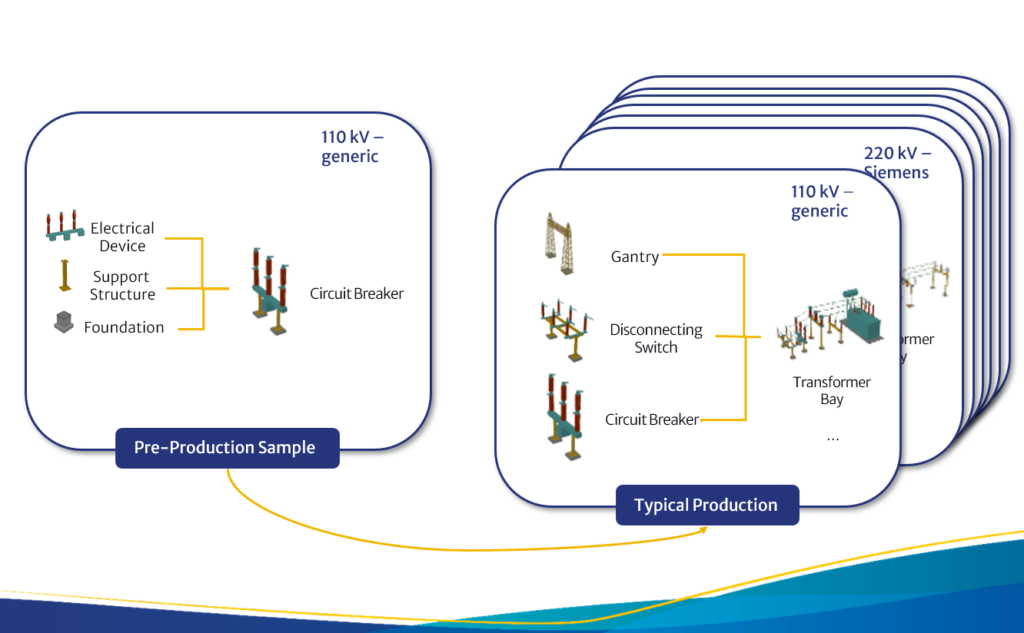
10x faster designs with primtech? Yes, if we create your Typicals.
We use a representative substation per voltage level as a reference project. Together, we define how objects are structured, which information is captured, how libraries and templates are organized and how the typicals should be developed.
The pre-production sample is a first set of typicals that we create. Once this set is approved, our team produces all necessary typicals and combines them in bay templates. Our large component and template library makes it easy for us to derive your custom standards.
People make the implementation work
This is the team you need to support the implementation process.
- Key Users become the link between your organization and primtech. They understand the software, the agreed standards and the practical requirements of your projects.
- End Users
- IT Administrators